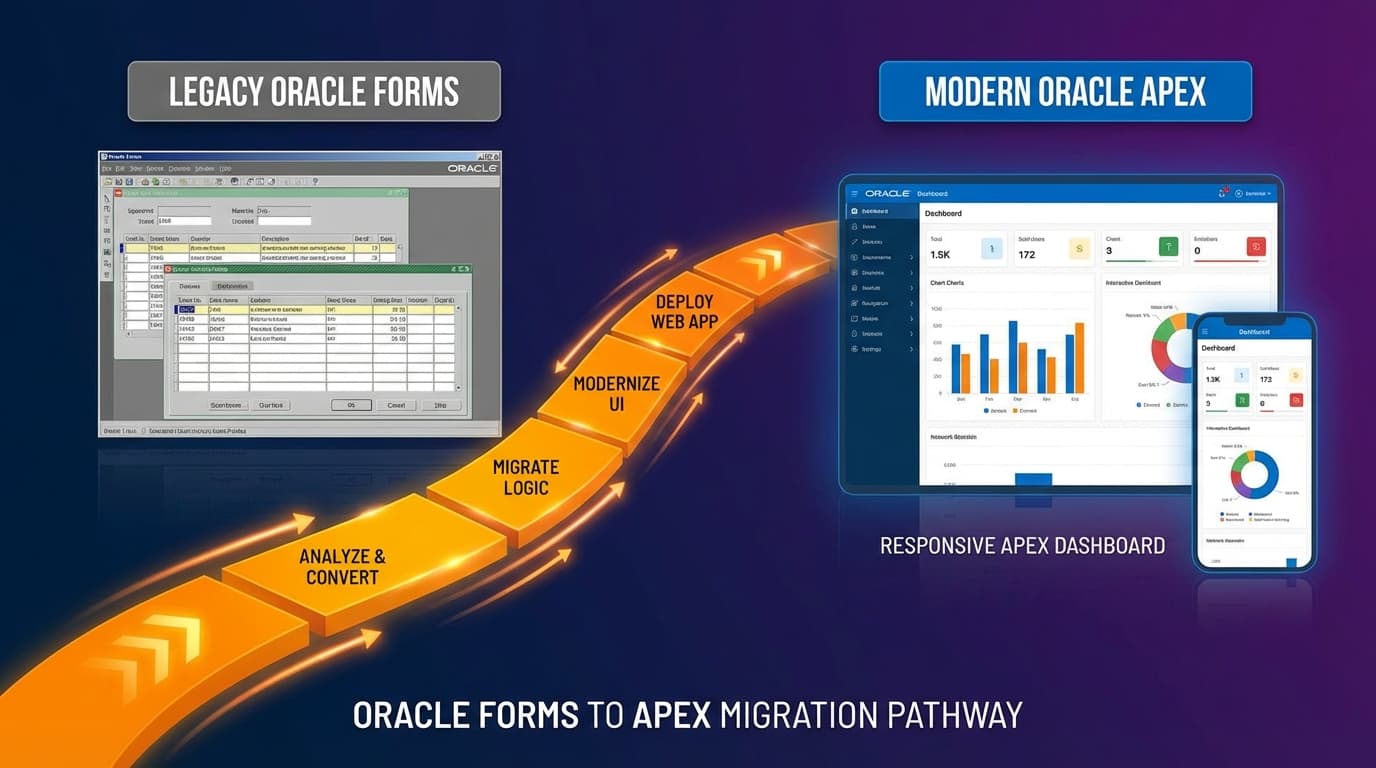
Your Oracle Forms application has served your enterprise faithfully for 15, maybe 20 years. It works. Your users know it. Your business logic is embedded in thousands of PL/SQL packages. But Oracle has ended support, finding developers is nearly impossible, and every day the gap between your legacy system and modern business requirements grows wider. Sound familiar? You are not alone—and there is a path forward that does not require a risky big-bang rewrite.
Why APEX Is the Natural Migration Target
Oracle Application Express (APEX) has emerged as the clear successor for Oracle Forms applications, and for good reason. Unlike migration targets that require learning new languages and rearchitecting everything, APEX preserves what matters most: your Oracle Database and all the PL/SQL business logic you have invested decades building.
The goal is not to replicate Oracle Forms in APEX. The goal is to deliver modern functionality while preserving the business value embedded in your existing code.
APEX runs directly in the Oracle Database. Your PL/SQL packages, procedures, and functions work unchanged. Your data model stays intact. The migration becomes about transforming the user interface, not rebuilding business logic from scratch. The platform also keeps improving—APEX 26.1 added Git-native source control and governed AI features.
The Three Migration Approaches
After completing over 50 Forms-to-APEX migrations for DACH enterprises, we have identified three distinct approaches. The right choice depends on your specific situation.
Approach 1: Automated Conversion with Manual Refinement
Tools like APEX Instant and Pitss.CON can automatically convert Forms modules to APEX pages. This sounds attractive—but use it wisely.
- Best for: Simple data entry forms with standard layouts
- Conversion rate: Typically 60-70% of UI elements convert automatically
- Hidden cost: The remaining 30-40% often takes longer to fix than building from scratch
- Our recommendation: Use for initial assessment, but plan for significant manual work
Approach 2: Progressive Modernization (Strangler Fig)
Run Forms and APEX side-by-side. Migrate module by module, with shared database and PL/SQL layer. Users gradually shift from Forms to APEX as modules are completed.
- Best for: Large applications (100+ forms) with continuous business operations
- Timeline: 12-24 months for typical enterprise applications
- Risk profile: Low—business continues uninterrupted during migration
- Key success factor: Clear module boundaries and migration sequence
Approach 3: Clean Slate Redesign
Use migration as an opportunity to rethink workflows, not just replicate them. Keep PL/SQL business logic but redesign the user experience.
- Best for: Applications where business processes have evolved beyond the Forms implementation
- Timeline: 18-36 months depending on complexity
- Risk profile: Medium—requires strong business analyst involvement
- Payoff: Dramatically improved user experience and process efficiency
The Five Migration Phases
Regardless of approach, successful migrations follow these phases:
Phase 1: Discovery and Assessment (4-6 weeks)
Before writing any code, understand what you have. Inventory all Forms modules, PL/SQL dependencies, database objects, and external integrations. Map business processes to technical components. Identify obsolete functionality that can be retired.
We use automated scanning tools to analyze Forms FMB files and generate dependency maps. This reveals hidden complexity and informs realistic timeline estimates.
Phase 2: Architecture and Planning (2-4 weeks)
Define the target APEX architecture. Key decisions include:
- Single application vs. multiple applications
- Authentication integration (LDAP, SSO, custom)
- Role-based access control mapping
- Report migration strategy (Oracle Reports to APEX native or BI Publisher)
- Interface patterns (modal dialogs, master-detail, interactive grids)
Phase 3: Foundation Build (4-8 weeks)
Create the APEX application foundation: shared components, templates, authentication, authorization schemes, and core navigation. Establish coding standards and component libraries that accelerate subsequent development. Since APEX 26.1, this is also the moment to put the application under Git from day one with APEXlang.
Phase 4: Module Migration (varies)
Migrate Forms modules to APEX pages following the established patterns. Prioritize based on business criticality and technical dependencies. Each module goes through development, testing, and user acceptance before the next begins.
Phase 5: Cutover and Optimization (4-6 weeks)
Final data migration, parallel running, user training, and go-live. Post-migration optimization addresses performance tuning and user feedback.
Common Pitfalls and How to Avoid Them
Pitfall 1: Underestimating Trigger Complexity
Forms triggers often contain business logic that is not immediately visible. WHEN-VALIDATE-ITEM triggers may perform complex validations. POST-QUERY triggers may derive calculated values. Missing these creates subtle bugs that only appear in production.
Solution: Comprehensive trigger analysis during discovery. Document every trigger and its APEX equivalent.
Pitfall 2: Ignoring the Report Challenge
Oracle Reports migration is often treated as an afterthought. But if you have hundreds of reports, this is a project in itself. APEX native reporting handles simple cases. Complex reports may need BI Publisher or Jasper.
Solution: Inventory reports early. Categorize by complexity. Plan the migration approach for each category.
Pitfall 3: Performance Assumptions
Forms applications are client-server. APEX is web-based. Query patterns that work well in Forms may create performance issues in APEX. Interactive Grids loading 10,000 rows? That was fine in Forms but requires pagination in APEX.
Solution: Performance testing throughout migration, not just at the end. Refactor data retrieval patterns where needed.
Pitfall 4: Underestimating Change Management
Users who have worked with Forms for years need time to adapt. The APEX interface is different. Keyboard shortcuts change. Workflows may be reorganized.
Solution: Involve key users early. Conduct pilot testing with real business scenarios. Invest in training.
The Business Case for Migration
Why migrate now rather than later? The case is compelling:
- Support costs: Finding Oracle Forms developers is increasingly difficult and expensive
- Security: Unsupported software creates compliance and security risks
- Integration: Modern APIs, mobile access, and cloud integration become possible
- User experience: Web-based APEX dramatically improves usability
- Total cost: Long-term APEX maintenance costs are typically 40-60% lower than Forms
Why LuminaByte for Oracle Forms Migration
Oracle Forms modernization is not a side project for us—it is a core specialty. Our team includes former Oracle consultants with decades of Forms and APEX experience. We have completed migrations ranging from 20-form departmental applications to 500+ form enterprise systems.
We understand DACH enterprise requirements: German-language support, GDPR compliance, integration with SAP and other enterprise systems, and the rigorous change management processes that large organizations require.
Start Your Migration Assessment
Every successful migration begins with understanding what you have. Our complimentary assessment analyzes your Forms application, identifies complexity factors, and provides a realistic migration roadmap with timeline and investment estimates.
Your Oracle Forms application has served you well. Now it is time to carry that investment forward into a modern platform that will serve you for the next 20 years. Ready to explore your options? Learn more about our legacy modernization services.