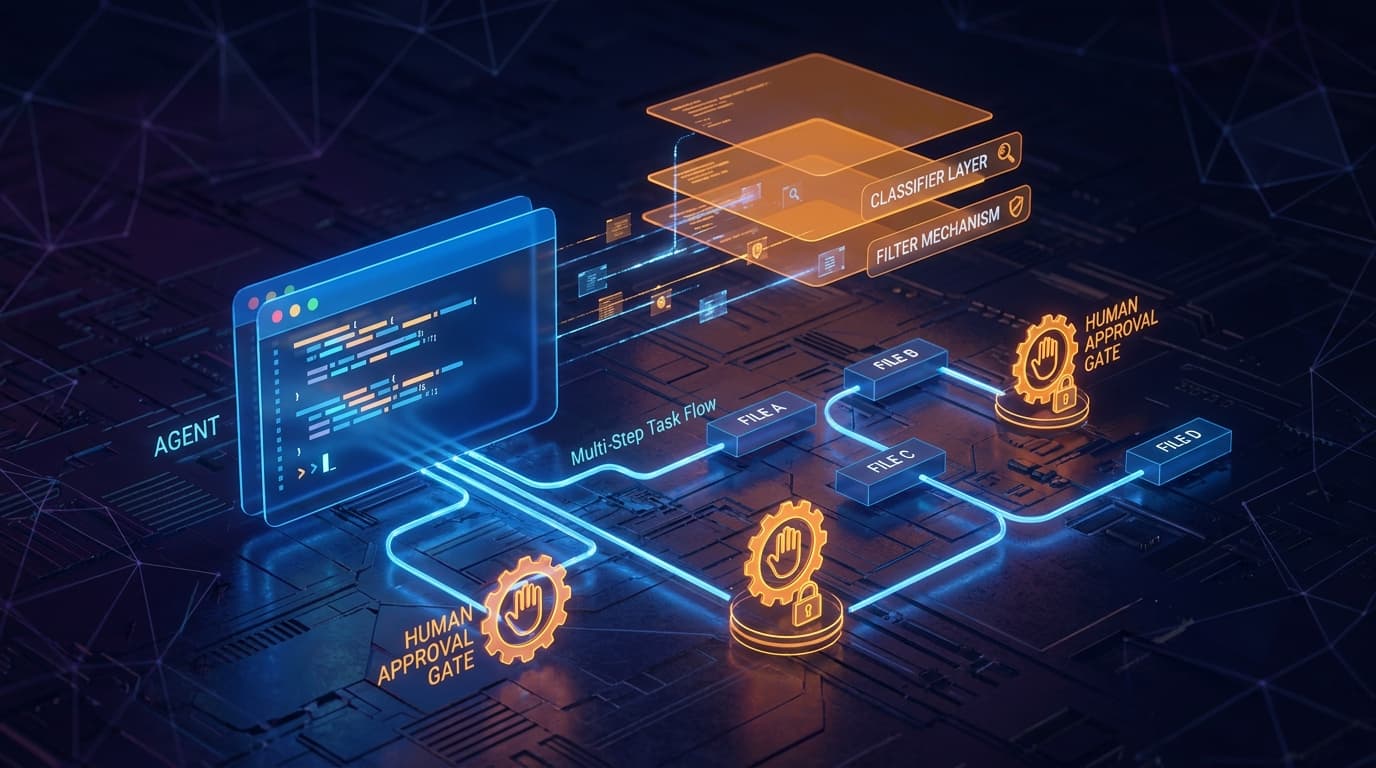
Anthropic announced Auto Mode for Claude Code at Code with Claude 2026, and it changes the rhythm of agentic coding more than most of the other features in the same release. The promise is straightforward: instead of approving every step the agent takes, you let it execute a sequence — read the codebase, plan, edit several files, run tests, iterate on failures — and you intervene at the moments that genuinely warrant a human decision. The implementation is more interesting than the promise.
What Auto Mode actually does
Claude Code without Auto Mode is a turn-based collaboration: the agent proposes, you approve, the agent acts, you read, the agent proposes again. The pattern is safe and conservative — and slow for routine work. Auto Mode flips the default. The agent executes a multi-step plan continuously, interrupting only when a guard triggers.
The guards layer is the design's centre of gravity. According to Anthropic's published descriptions, Auto Mode wraps the execution loop in:
- Input filtering that classifies user instructions before they reach the agent's planning loop.
- Action evaluation that scores the agent's intended next action and routes it through the right gate.
- Two-stage classification for sensitive operations — anything that touches production, deletes data, or pushes outside the local sandbox.
- Human approval checkpoints that are mandatory, not optional, for the highest-risk categories.
The net effect is "the agent runs by itself for the safe ninety percent and asks you about the dangerous ten." That is the productivity unlock.
Why this is not just "YOLO mode"
Earlier agentic coding tools shipped with an "auto-approve everything" toggle that experienced developers used cautiously and inexperienced developers used carelessly. The complaints from production teams were predictable: forgotten rm -rf calls, accidental pushes to main, credentials read into the conversation log.
Auto Mode is explicitly not that toggle. It is a layered approval system with classes of operations: file edits in the working tree are routinely approved, package installations get more scrutiny, git operations that touch shared state get human gates, anything that calls external APIs with credentials gets the strictest path. The agent is not "freed"; it is "permitted within a clear envelope."
What changes for an enterprise team
Three concrete shifts in how a team uses Claude Code.
Faster routine work. The class of tasks that used to take fifty approval clicks — write a test, fix a lint error, refactor a function across files, regenerate a migration — collapses to one approval at the start and one at the end. For teams using Claude Code for daily maintenance, the time saved is real.
Sharper review at the right moments. Because the agent only interrupts at meaningful checkpoints, the moments you do approve carry weight. The cognitive load of "should I keep watching" drops; the focus on "should this happen" rises.
Clearer audit trail. Every action and every gate is logged. For organisations that need to defend "what did the AI actually do today" — most regulated industries by 2026 — that log is the entire story.
Autonomy without guards is irresponsible. Approval without autonomy is exhausting. Supervised autonomy is what makes agentic coding actually usable at work.
How to roll it out safely
A pragmatic sequence:
- Enable Auto Mode in personal sandboxes first. Let individual developers feel the cadence change on their own branches for a week.
- Define the gate policy at team level. Decide which operation classes require human approval. Write it down. Avoid relying on defaults — hooks and memory are the mechanisms for codifying it.
- Pilot on a single repository with full logging on. Review the logs after a week — what got approved automatically, what got gated, what surprised you.
- Update the policy. The first week's data usually reveals one or two over-permissive defaults and one or two over-strict ones.
- Expand to other repositories with the refined policy.
Where Auto Mode is not the right tool
Be honest about the boundary. Auto Mode is excellent for code that lives in your repository, runs locally and can be reverted with Git. It is not the right shape for:
- Direct production changes (use a deployment pipeline; let the agent open a PR).
- Irreversible data operations (migrations against production data deserve a human typing every command).
- Cross-system orchestration that touches messaging, payments or external customers (use Auto Mode to draft, never to execute).
These are not Auto Mode failures; they are decisions about which layer is responsible for safety. The agent is responsible for code quality; the deployment pipeline is responsible for production safety.
What this implies for the broader market
Auto Mode is one of several signals in 2026 that agentic coding tools are maturing past the "impressive demo" stage and into the "fits in our workflow" stage (for how the open-source side compares, see OpenCode vs Claude Code). The five features Anthropic shipped around it — Dreaming, Outcomes, multi-agent orchestration, Claude Finance, and Add-ins — together describe a stack where AI is a serious collaborator in production engineering, not a clever assistant in a side panel.
For enterprise teams, the question stops being "should we use AI coding tools" and starts being "which approval boundary do we draw, where, and who is accountable for what." Auto Mode gives you the controls to answer that question precisely. The work now is writing your team's policy and pressing go. If you want help drawing those boundaries, that is exactly what our AI enablement services cover.