Almost every BI tool in 2026 promises the same thing: ask a question in plain English, get an answer. Almost all of them work the same way: an LLM translates your question into SQL, the SQL runs, the answer comes back. And almost all of them fail in the same way: at some point the SQL is subtly wrong, the answer is convincing, and someone makes a decision they should not have. Oracle's AI Interactive Reports in APEX 26.1 take a different architectural choice — and that choice is worth understanding before you build on it.
The pattern Oracle refused to build
The dominant pattern in the industry is what you might call NL-to-SQL with hope. The user types a question. The model reads the database schema, generates a SQL query, executes it, and renders the result. The model has wide latitude: any table, any join, any aggregation. The user has no way to see what was actually run unless they go look at the SQL — which they will not.
This pattern produces three failure modes that are now well documented:
- Wrong joins. The model picks a plausible but incorrect join path, returning numbers that look right but are not.
- Missed filters. The model "forgets" a tenant filter, a date scope or a soft-delete flag, exposing data outside the user's normal context.
- Untraceable changes. Tomorrow the same question produces different SQL, and no one can explain why.
None of these are theoretical. They are the reason most enterprise data teams quietly disable the "ask AI" feature after the first incident.
What Oracle built instead
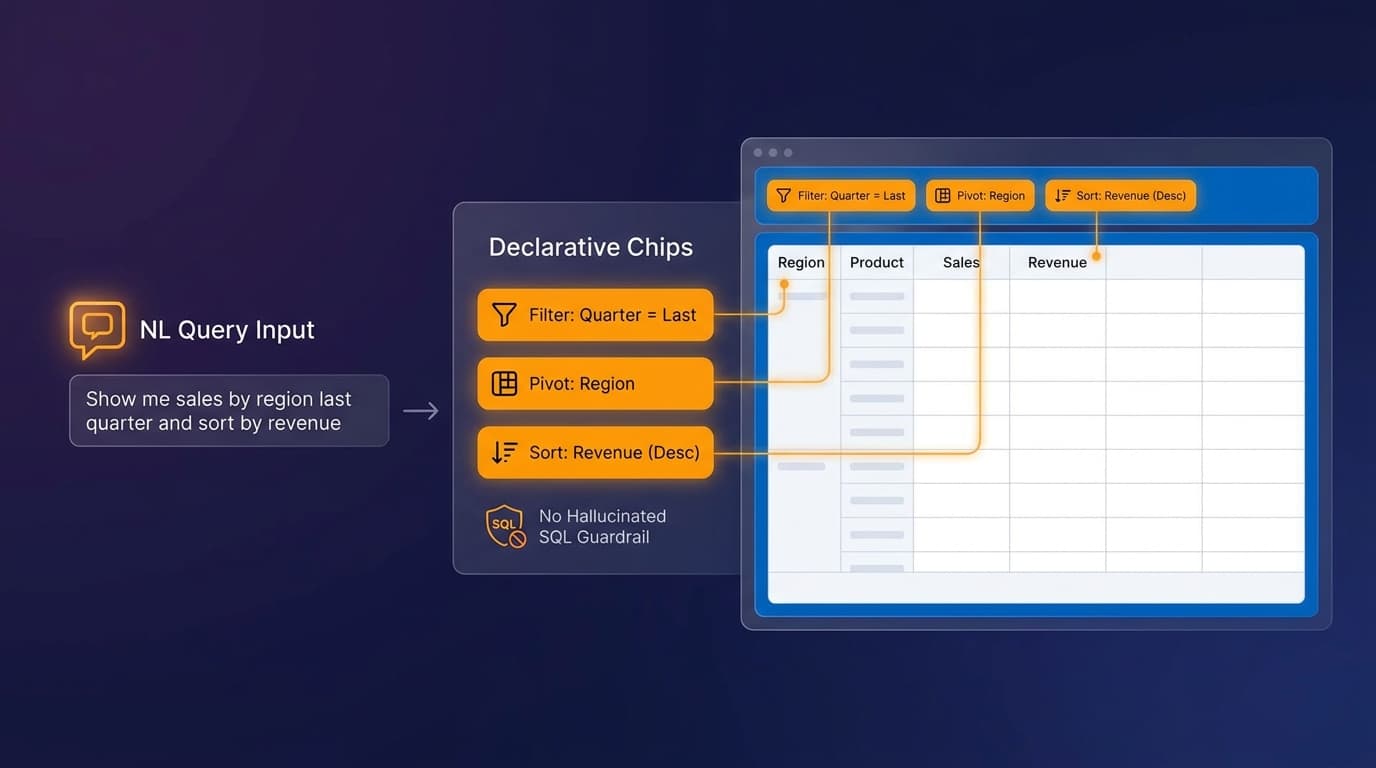
AI Interactive Reports turn a natural-language request into declarative Interactive Report settings against an existing report definition. The user asks "show only this quarter's German customers with unpaid invoices over 10,000 euros, grouped by sales region". APEX translates that into:
- A filter chip on
invoice_date. - A filter chip on
customer_country. - A filter chip on
invoice_status. - A filter chip on
invoice_amountwith operator and value. - A group-by setting on
sales_region.
Crucially, those chips appear on the report. They are visible. They are editable. The user can remove the filter on country, add highlighting, change the aggregation. Nothing happens behind a curtain.
Why "declarative settings" beats "generated SQL"
The architectural shift matters for four concrete reasons.
Permissions still apply. The report definition already enforces row-level security, column visibility and any application-level filters. The AI cannot reach data the user could not reach by clicking manually.
Audit is unchanged. Whatever logging and audit you have on Interactive Reports today applies to AI-driven changes too. There is no parallel "AI query" log to maintain.
The surface area is finite. An LLM that can output arbitrary SQL has effectively unbounded behaviour. An LLM that can only emit known IR settings has a well-defined output space — the same one your QA already tests.
Users learn the tool. When the AI applies a filter visibly, the user sees how it works and can do it themselves next time. The AI becomes a teacher, not a black box.
Generated SQL hides the model's choices. Generated chips show them. Showing them is the entire feature.
Where it fits and where it does not
AI Interactive Reports are the right pattern when the underlying report is well-defined: a curated dataset with sensible joins, agreed-upon columns and meaningful aggregations. They shine for the long tail of "I just want to slice this report a different way" requests that today force a ticket to BI.
They are not the right pattern for open-ended exploratory analysis across many fact tables — that is still the job of a full BI tool with a semantic layer and a trained analyst (see our comparison of Power BI and Oracle Analytics). The line is roughly: if the question can be answered by changing the settings on a report you would have built anyway, AI Interactive Reports are the answer; if the question requires inventing the report, it is not.
How to roll it out without losing trust
A practical sequence for adoption:
- Start with one well-curated report. Ideally one with clear column names, a documented dataset and a known user community.
- Brief the users. Explain that the AI is changing the same filters they could change manually. Show them a chip being added and removed.
- Watch the first hundred queries. Look for cases where users asked for something the chips cannot express. Those are your next backlog items, not bugs.
- Update the report definition when you see recurring requests that require new columns or new joins. The AI is a forcing function for better report design.
- Resist the temptation to turn it on for every report in the workspace. Curated rollout beats blanket rollout for trust.
Why this is a strategic move, not a feature
For two years the AI-and-data conversation has been dominated by demos where a chatbot writes SQL on stage. Real enterprises have struggled to deploy those demos because the failure modes are unacceptable in regulated contexts. By making the constrained, declarative version the default in APEX, Oracle is offering a path that compliance teams can actually sign.
That is a sober answer to a hyped problem. It is also exactly the kind of pragmatic choice that makes a platform durable. If you are planning governed AI features on Oracle data, our AI solutions team helps DACH enterprises design exactly these patterns.